


Here at Well Placed Cactus we don’t have a physical office. In fact we all live in different places; Jack in Sydney, Paul on the Gold Coast and I live up here in lovely Brisbane.
We have been working together for the past 2 years and on average we have the chance to be together in the same place only around 4 times a year. It took us quite some time to transition into this way of working and we are still trying to optimise the way we all work, but I thought it might be useful to describe our methods for anyone wanting to set up a remote studio. Let’s dive right in.
After 2 years we have established a pretty good virtual office. We all work similar hours during the day and while we work we use TeamSpeak as our main form of communication to stay connected throughout the day. Our TeamSpeak server costs around $2.50 per month for up to 10 simultaneous users. It uses hardly any bandwidth compared to things like Skype and Google Hangouts and provides us with an efficient way to talk to each other while we work. We can easily ask questions, send links via text chat and separate into different rooms if we take a break or need a little quiet.

Team Speak!
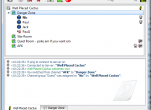
For those of you not familiar with TeamSpeak, here’s a quick run down of ours. We have 4 rooms people can move between. We have the “Danger Zone” which gets the most use throughout the day, it’s the equivalent of walking up to someone’s desk and talking to them. The “War Room” is for discussions when we don’t want to disturb anyone else. In the “Quiet Room” microphones are muted so it’s great for doing really intense or sound specific work. If someone is in this room we know they are available and we can reach them with text chat, but we can’t interrupt them during something important. And finally we have “AFK” for when someone takes a break or goes to lunch or something.
Our second line of communication is Google Hangouts. Every morning we fire up our webcams and enter a Hangout to do our daily standup. Being able to video chat is a great way to remind yourself that the other people in your team actually exist and are not just figments of your imagination. Google Hangouts also lets you screen share, watch YouTube videos and edit Google Docs at the same time, which is extremely handy during meetings, design sessions and admin work. Occasionally we will use Skype when working with clients who are unfamiliar with Hangouts, but we find that Hangouts provide higher quality audio/video so we try to use it whenever we can.
Simple tools can really help out communication within a small team. Having the ability to see that everyone is online and working at the same time as you, is a great motivator and has really helped us along the way. Next time I might talk about how we do time/task tracking and other handy stuff.
If you have any questions let us know. If you have any other ideas on communication, let us know, we’re always trying to improve our methods.
Don’t forget to come back for more blog stuff soon.
Nic
1
0 Comments to "Successful Communication for Remote Studios"