


So the blog is supposed to be a mixture of Game and Biz dev, so far its been pretty heavy on the biz but today I’m going to show you how to make some mobile friendly chaser lights in unity.
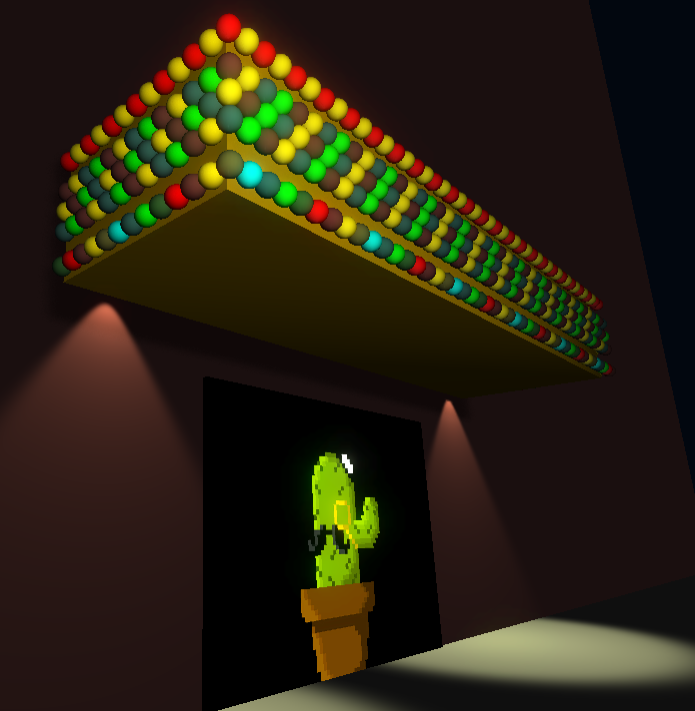
Rather than run you through all the code I’m going to talk through some of the design ideas and just upload all the code with comments so you can work through it in your own pace.
At its core the system subsists of 3 scripts. The first ChaserLight.cs is just used to help find and create systems. The public int allows you to set the system id that a series of lights will belong to.
ChaserLightWindow.cs is to keep the generation of the system outside the start function. Depending on the size and number of systems there can be some overhead. This creates a Chaser Lights entry in the window menu where you can find the lights for each system.
ChaserLightSystem.cs is where the core functionality lies. This script is designed to be a standalone system that could be easily incorporated into any project. Its efficient, in that it uses mobile shaders, has an option for specularity and generates no garbage at runtime.
It can be set on and to randomly change, the key parameters are all clear and available in the inspector. It then has a a few key public functions;
The key things in these scripts which may be valuable to learn are;
Hopefully you can get some value out of the coding practises presented, and you are welcome to use the system in any projects you like, the download link is below the video. If you do use it, let us know!
Download Chaser Light Package
1
0 Comments to "Tutorial: Chaser Lights in Unity"