


Last time we talked about how our team communicates, but today we are going to reveal our terrible secret; How we manage our tasks, time and documentation.
We work with many different clients so it’s super important to make sure no time is wasted and that we can see information about time spent on different tasks, for this we use ClockingIt . ClockingIt is an online task tracking application, you can add tasks, designate a Client, project, milestone, due date, expected duration, priority etc. and then assign these tasks to a team member. What you end up with is a prioritised task list that can be sorted by project, but the best part by far is that it can track time spent on tasks. When you start working you can select the appropriate task and begin a timer, when you finish you can go back stop the timer and move on to the next task. The data from all your completed tasks can then be turned into timesheets and other lists that can be used for billing clients. ClockingIt is free, takes some getting used to and sometimes has a few issues, but once you get up and running, it’s a great tool.
There are better paid tools for for tracking time and tasks but it’s hard to beat a free service especially when you are just starting up. Recently we have been thinking of switching to Paymo , a paid service with a more streamlined workflow and other handy features like PC and phone apps.
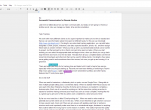
When we need to brainstorm, collaborate, pitch or quote, we use Google Docs. Being able to have multiple people editing a doc is extremely handy. When we started Well Placed Cactus we were part of the New Enterprise Incentive Scheme and in doing so we needed to complete a business plan. Each one of us would be working on it at the same time, picking a section to expand on and then having someone proof read it as soon as it was complete. working like this is a great way to get some of the dry admin work completed in a short amount of time.

Next Level Collaboration
By far our most used doc is titled “Email proofing doc”. When we need to write emails to potential and current clients we do it in this doc. When we are finished we get whoever is around to have a quick read, check out if there are any issues with spelling, grammar or sentence structure and most importantly make sure there is no unintentional anger, disinterest or anything that could be taken the wrong way for some reason or another. This vastly improves the quality of our emails and ensures that they are kept professional. We don’t do this for all emails, but the most important ones get this treatment, the whole process takes a couple of minutes, and ensures we hit every point we need to, don’t unintentionally offend anyone and it keeps everyone in the loop.
Time tracking and keeping all your documentation in order is an extremely important aspect of running your own business. Our way is not perfect for everyone, but it works well for us. It also gives us a large amount of information and flexibility. If you have any ideas or information about some other interesting ways of managing this stuff let us know and if you have any questions feel free to get in touch.
Also, you should all totally get an email proofing document, they are super good.
Nic
0 Comments to "Working remote – Task tracking and documentation"